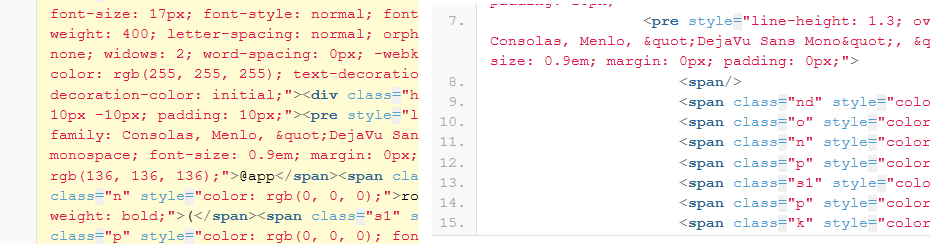
Посредством данного плагина можно структурировать не структурированной HTML код.
было так:
<!--StartFragment--><h3 style="font-weight: normal; margin: 30px 0px 10px; padding: 0px; color: black; font-size: 25.5px; font-family: Garamond, Georgia, serif; font-style: normal; font-variant-ligatures: normal; font-variant-caps: normal; letter-spacing: normal; orphans: 2; text-align: start; text-indent: 0px; text-transform: none; widows: 2; word-spacing: 0px; -webkit-text-stroke-width: 0px; white-space: normal; background-color: rgb(255, 255, 255); text-decoration-thickness: initial; text-decoration-style: initial; text-decoration-color: initial;"><font dir="auto" style="vertical-align: inherit;"><font dir="auto" style="vertical-align: inherit;">Уникальные URL-адреса / Поведение перенаправления<span> </span></font></font><a class="headerlink" href="https://flask.palletsprojects.com/en/stable/quickstart/#unique-urls-redirection-behavior" title="Ссылка на этот заголовок" style="text-decoration: underline 1px dotted rgb(0, 75, 107); color: rgb(221, 221, 221); visibility: hidden; margin: 0px 0.2em; padding: 0px 0.2em; border: none;"><font dir="auto" style="vertical-align: inherit;"><font dir="auto" style="vertical-align: inherit;"></font></font></a></h3><p style="hyphens: auto; line-height: 1.4; color: rgb(62, 67, 73); font-family: Garamond, Georgia, serif; font-size: 17px; font-style: normal; font-variant-ligatures: normal; font-variant-caps: normal; font-weight: 400; letter-spacing: normal; orphans: 2; text-align: start; text-indent: 0px; text-transform: none; widows: 2; word-spacing: 0px; -webkit-text-stroke-width: 0px; white-space: normal; background-color: rgb(255, 255, 255); text-decoration-thickness: initial; text-decoration-style: initial; text-decoration-color: initial;"><font dir="auto" style="vertical-align: inherit;"><font dir="auto" style="vertical-align: inherit;">Следующие два правила различаются использованием завершающего слеша.</font></font></p><div class="highlight-default notranslate" style="clear: both; margin: 1em 0px; color: rgb(62, 67, 73); font-family: Garamond, Georgia, serif; font-size: 17px; font-style: normal; font-variant-ligatures: normal; font-variant-caps: normal; font-weight: 400; letter-spacing: normal; orphans: 2; text-align: start; text-indent: 0px; text-transform: none; widows: 2; word-spacing: 0px; -webkit-text-stroke-width: 0px; white-space: normal; background-color: rgb(255, 255, 255); text-decoration-thickness: initial; text-decoration-style: initial; text-decoration-color: initial;"><div class="highlight" style="background: rgb(248, 248, 248); margin: 10px -10px; padding: 10px;"><pre style="line-height: 1.3; overflow: auto hidden; clear: both; font-family: Consolas, Menlo, "DejaVu Sans Mono", "Bitstream Vera Sans Mono", monospace; font-size: 0.9em; margin: 0px; padding: 0px;"><span></span><span class="nd" style="color: rgb(136, 136, 136);">@app</span><span class="o" style="color: rgb(88, 40, 0);">.</span><span class="n" style="color: rgb(0, 0, 0);">route</span><span class="p" style="color: rgb(0, 0, 0); font-weight: bold;">(</span><span class="s1" style="color: rgb(78, 154, 6);">'/projects/'</span><span class="p" style="color: rgb(0, 0, 0); font-weight: bold;">)</span>
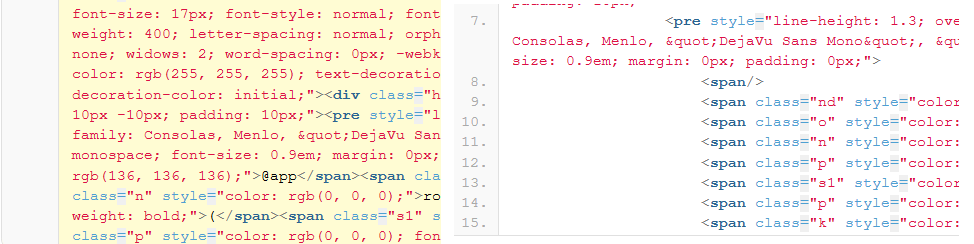
стало так:
<!--StartFragment--> <h3 style="font-weight: normal; margin: 30px 0px 10px; padding: 0px; color: black; font-size: 25.5px; font-family: Garamond, Georgia, serif; font-style: normal; font-variant-ligatures: normal; font-variant-caps: normal; letter-spacing: normal; orphans: 2; text-align: start; text-indent: 0px; text-transform: none; widows: 2; word-spacing: 0px; -webkit-text-stroke-width: 0px; white-space: normal; background-color: rgb(255, 255, 255); text-decoration-thickness: initial; text-decoration-style: initial; text-decoration-color: initial;">Unique URLs / Redirection Behavior<a class="headerlink" href="https://flask.palletsprojects.com/en/stable/quickstart/#unique-urls-redirection-behavior" title="Link to this heading" style="text-decoration: underline 1px dotted rgb(0, 75, 107); color: rgb(221, 221, 221); visibility: hidden; margin: 0px 0.2em; padding: 0px 0.2em; border: none;"/> </h3> <p style="hyphens: auto; line-height: 1.4; color: rgb(62, 67, 73); font-family: Garamond, Georgia, serif; font-size: 17px; font-style: normal; font-variant-ligatures: normal; font-variant-caps: normal; font-weight: 400; letter-spacing: normal; orphans: 2; text-align: start; text-indent: 0px; text-transform: none; widows: 2; word-spacing: 0px; -webkit-text-stroke-width: 0px; white-space: normal; background-color: rgb(255, 255, 255); text-decoration-thickness: initial; text-decoration-style: initial; text-decoration-color: initial;">The following two rules differ in their use of a trailing slash.</p> <div class="highlight-default notranslate" style="clear: both; margin: 1em 0px; color: rgb(62, 67, 73); font-family: Garamond, Georgia, serif; font-size: 17px; font-style: normal; font-variant-ligatures: normal; font-variant-caps: normal; font-weight: 400; letter-spacing: normal; orphans: 2; text-align: start; text-indent: 0px; text-transform: none; widows: 2; word-spacing: 0px; -webkit-text-stroke-width: 0px; white-space: normal; background-color: rgb(255, 255, 255); text-decoration-thickness: initial; text-decoration-style: initial; text-decoration-color: initial;"> <div class="highlight" style="background: rgb(248, 248, 248); margin: 10px -10px; padding: 10px;"> <pre style="line-height: 1.3; overflow: auto hidden; clear: both; font-family: Consolas, Menlo, "DejaVu Sans Mono", "Bitstream Vera Sans Mono", monospace; font-size: 0.9em; margin: 0px; padding: 0px;"> <span/> <span class="nd" style="color: rgb(136, 136, 136);">@app</span> <span class="o" style="color: rgb(88, 40, 0);">.</span> <span class="n" style="color: rgb(0, 0, 0);">route</span> <span class="p" style="color: rgb(0, 0, 0); font-weight: bold;">(</span> <span class="s1" style="color: rgb(78, 154, 6);">'/projects/'</span> <span class="p" style="color: rgb(0, 0, 0); font-weight: bold;">)</span> <span class="k" style="color: rgb(0, 68, 97); font-weight: bold;">def</span>
В Notepad++ есть несколько способов структурировать HTML-код:
1. Автоматическое форматирование (встроенное)
Плагин XML Tools (рекомендуется):
- Установите плагин через Плагины → Plugins Admin → найдите «XML Tools»
- После установки выберите весь код (Ctrl+A)
- Нажмите Плагины → XML Tools → Pretty print (XML only — with line breaks)
- Или используйте горячую клавишу Ctrl+Alt+Shift+B